Start.gg
- 3.8
- Rating
- 10.00K
- Installs
- Free
- Price

 Analysis by App-foxy
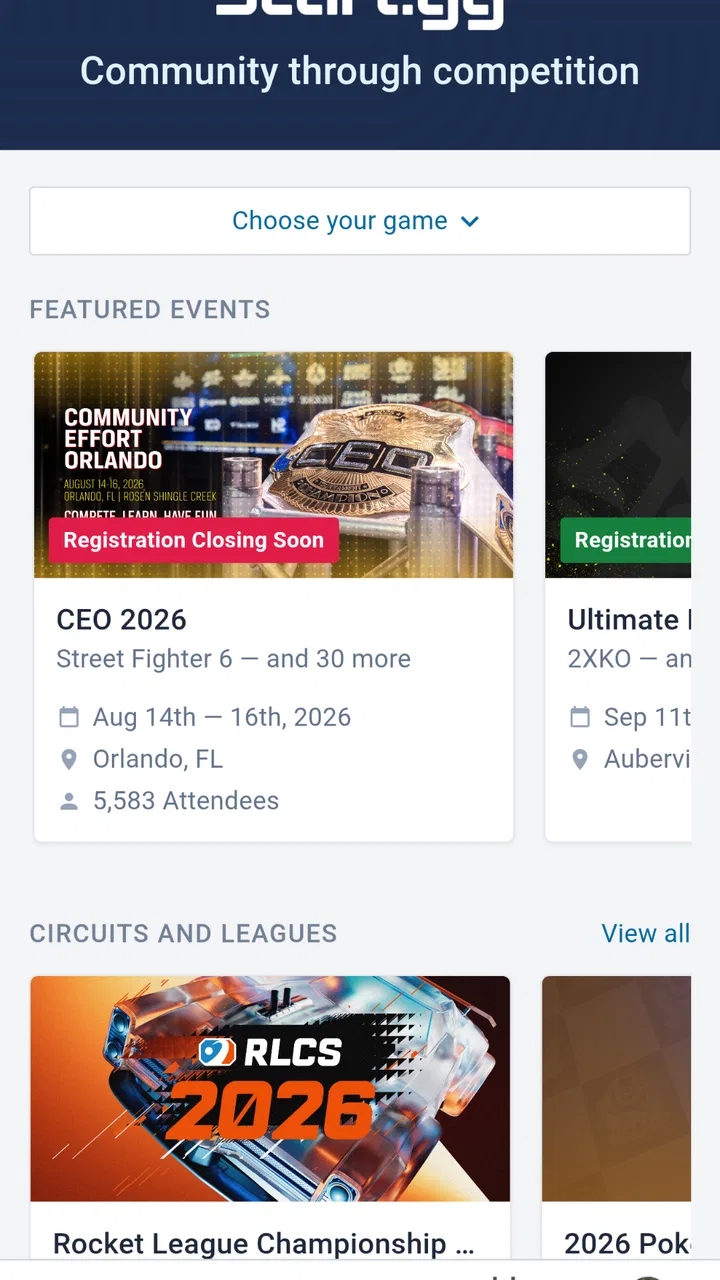
I approached Start.gg as an event companion rather than as a general social network or a game in its own right. It belongs to the Events category, is developed by Start.gg, and is free to use. The basic idea is easy to understand: it is meant to be a home for competitive gaming events, giving players and spectators a focused place to follow that side of gaming. After spending time with it, my impression is that its value depends less on flashy presentation and more on whether competitive events are already part of your routine.
That distinction matters. If you only play casually and rarely look for organized tournaments, this app may feel narrower than the usual game discovery or community apps. If you regularly enter brackets, watch tournament activity, or need one place to keep track of competitive gaming plans, its focused purpose makes more sense. I would describe it as a practical event tool with a clear audience, not an all-purpose gaming destination.
How Start.gg feels when you use it for competitive events
The first thing I noticed is that the app’s usefulness is tied to the information you want from it. A competitive player usually does not need another feed full of unrelated content; they need to find the right event, understand what it is about, and return to it when the event becomes relevant. That makes a focused events app potentially more convenient than jumping between social posts, chat messages, community pages, and browser tabs.
You May Also Like

 Blood Strike: 2.5 Anniversary
Blood Strike’s Loadouts Turn Every Drop Into a Tactical Gamble
A close look at Blood Strike’s custom loadouts: how fast access to signature weapons reshapes its battle royale rhythm, rewards preparation, and narrows the gap between fights.

 Pandora - Music & Podcasts
Pandora’s Music Is Easy to Start, but Harder to Recover
Pandora’s strength is its low-effort path from a seed to a station. Its weak spot is how much confidence it asks you to place in connection, setup, and quiet recovery.

 8 Ball Pool
 Is Built on Rivalries, Rematches, and Routine
A close look at the rivalries, rematches, shared routines, and unanswered safety questions that turn a quick pool match into a persistent mobile community.

 Samsung Music
’s Quiet Strength Is Playing What You Already Own
Its reach comes less from spectacle than from dependable access to a personal library. That simplicity is both the app’s strongest retention engine and its ceiling.

 AccuWeather: Weather Radar
AccuWeather Review: A Quick, Clear Forecast for Everyday Decisions
For everyday plans, the best forecast is the one you can understand quickly. AccuWeather makes rain timing, radar, and local conditions easy to act on, with a few trade-offs.

 Hill Climb Racing
Why Hill Climb Racing Still Turns Crashes Into One More Run
A tiny car, a bumpy hill and one more upgrade: Hill Climb Racing keeps resurfacing because its simple chaos makes every near-miss feel personal.
More From Our News Desk



In everyday use, I would open it with a specific question in mind: which event am I following, where do I need to look next, or what competitive activity is relevant to me? That makes the experience feel more direct than browsing a broad gaming platform. The trade-off is that the app may feel quiet or limited when you have no event to search for. Its strength is concentration, not endless entertainment.
The current version is 1.4.1, and the app has an average rating of 3.3 from around sixteen ratings, with two written reviews. I would treat that rating as an early signal rather than a definitive judgment. There is not enough public feedback in that small sample to tell every type of user how the app will feel, so I paid more attention to the practical question of fit: whether its event-centered approach matches your habits.
Speed expectations in a focused event app
For this kind of application, perceived speed is not just about how quickly a screen opens. What matters is whether I can move from opening the app to the event information I need without getting distracted or having to reconstruct details from several unrelated places. A narrow purpose can help here because the app does not need to behave like a full gaming marketplace, chat client, video service, and news reader at the same time.
I would still avoid judging it by the standards of a simple calculator or notes app. Event information naturally involves more context than a single static screen, and the usefulness of a competitive event platform comes from the relationships between events, participants, and tournament activity. That means a little more navigation can be reasonable if it keeps the information organized. The important question is whether those steps feel purposeful rather than repetitive.
My practical advice is to use it before you urgently need it. Install it ahead of a tournament, look around while you have time, and become familiar with the route to the event you care about. That small preparation changes the experience during a busy competition. Instead of learning the interface while trying to keep up, you can use the app as a quick reference point.
There is also a useful distinction between discovery and confirmation. An app like this can be valuable for finding or recognizing relevant competitive events, but once you have chosen one, you may use it more as a confirmation tool than as something you browse continuously. I would not expect every session to be long. Short, purposeful visits are likely to be the better way to use it.
What happens during heavy-use moments
The most demanding moments are likely to be practical rather than visual. A player may check the app repeatedly around an event, while a spectator may return several times to follow activity. Those repeated visits test more than opening speed: they test whether the app remains understandable when I am in a hurry, whether the important event stays easy to reach, and whether the interface encourages confident decisions instead of extra searching.
This is where I see the main trade-off of a dedicated event app. Compared with a general social platform, it can reduce noise. Compared with a simple message thread, it can offer a more structured place for event-related information. But it also becomes more important that the information hierarchy feels clear. When I am checking something between matches or while coordinating with friends, I do not want to spend time wondering which part of the app contains the detail I need.
A useful workflow is to separate planning from live checking. During planning, I would explore the relevant event and make a mental note of where its key information appears. During the event itself, I would avoid wandering through unrelated areas and return directly to that event. This approach reduces the app’s resource demands on my attention, which is often more important than battery or storage use during a competition.
Another realistic scenario is a small group of friends preparing for a weekend of competitive gaming. One person can use the app to identify the event they are interested in, while the group keeps conversation elsewhere. That division is sensible: the app handles event reference, while a chat tool handles personal coordination. Trying to force one app to do both jobs would be less efficient.
Reliability and the importance of recovery
Reliability is especially important for event software because the value of information rises at particular moments. If I am casually browsing and need to reopen a page, that is a minor annoyance. If I am checking something immediately before participating or watching, the same interruption feels much more serious. For that reason, I judge this app by how easy it is to recover from a missed screen, a closed session, or a moment of confusion.
I would not build my entire event routine around any single mobile app without a backup habit. Keep the event name or relevant details available in your normal notes or messages, and treat the app as the organized place to return to rather than the only place where your plans exist. That is not a criticism unique to Start.gg; it is sensible preparation whenever timing matters.
Recovery also includes remembering what you were doing. A good event companion should let me regain context quickly after switching to another app. If I have to start from the beginning every time, repeated checking becomes tiring. My recommendation is to test this before the important day: open the event, leave the app, return later, and see whether the route feels natural. That simple trial tells you more about personal reliability than a short first launch.
The developer is Start.gg, which gives the application a direct connection to the service it represents. That is useful in principle because the app is not trying to reinterpret competitive events as a generic calendar. Still, a direct connection does not automatically make every workflow perfect. I would pay attention to how consistently the app fits your particular event habits, especially if you move between mobile and other ways of checking information.
Device constraints and the right audience
The app supports devices running Android 5.1 or later, so its stated compatibility reaches back to older Android hardware. That is helpful for people who keep a reliable older phone as a second device or do not upgrade frequently. At the same time, compatibility alone does not guarantee that every older phone will feel equally comfortable. Screen size, system condition, available space, and general device health can all affect how pleasant an event app feels.
Because it is free and rated for Everyone, the barrier to trying it is low. I would be comfortable suggesting it to a player who wants to explore competitive events without committing money first. Free access is particularly useful for newcomers who are still deciding whether organized gaming belongs in their routine. They can test the workflow and decide whether the focused approach genuinely helps.
That does not mean it is automatically the best choice for every phone owner. Someone using an older device with limited available resources may prefer to keep only the tools they use every day. If competitive events are occasional for you, a browser or a message from a friend may be enough. Installing a dedicated app makes the most sense when the convenience of a persistent event-focused tool outweighs the extra application on your device.
I also would not confuse the Everyone rating with a promise that every event or competitive community will suit every person. The age classification describes the app’s general content suitability, while your choice of events is a separate matter. Parents, younger players, and newcomers should still choose communities and competitions thoughtfully, just as they would anywhere else online.
Where it beats the usual alternatives
The usual alternatives are scattered social posts, general calendars, browser searches, chat groups, and broad gaming platforms. Each can work, but they solve different problems. A social feed is good for conversation and quick announcements, yet important event details can disappear beneath newer posts. A chat group is excellent for coordination with friends, but it may not be organized around the event itself. A general calendar can remind you that something is happening without giving you a competitive gaming context.
Start.gg’s advantage is specialization. I would choose it when I want the event to be the center of the experience rather than an item buried inside a wider service. That focus can reduce the number of places I need to search, especially when I am following organized competitive activity rather than simply looking for something to play.
The alternative can be better when your needs are broader. If you want deep conversation, personal messaging, live video, or a general gaming news stream, a dedicated event app should not replace those tools. I see it as a complement to them. Use the event platform for structure, then use your preferred communication service for discussion and coordination.
One non-obvious trade-off is that centralization can make you more dependent on the app’s organization. With scattered sources, you may have to search more, but you can also cross-check information naturally. With a focused service, the experience is cleaner when the event structure matches your needs, yet more frustrating if you expect it to behave like a social hub. Knowing this before installing it prevents the common mistake of judging a specialized tool for not being something else.
Who should install it, and who should skip it
I would recommend trying it if you participate in competitive gaming events, regularly follow tournament activity, or want a dedicated place to return to instead of relying entirely on social posts. It is also worth considering if you are moving from casual play toward organized competition and want to develop a more deliberate event-checking routine.
I would be less enthusiastic for someone who plays alone, never watches competitive events, or wants one app to provide games, chat, news, and entertainment in equal measure. The store summary presents it as a home for competitive gaming events, and that narrow purpose is exactly how I would evaluate it. If that sentence does not describe your habits, the app may not earn a permanent place on your phone.
For a first-time user, I suggest choosing one event rather than trying to understand everything at once. Explore it, leave the app, come back, and decide whether the information is easier to manage than your current method. Then try a second event only if the first workflow feels useful. This staged approach gives you a fair test without turning installation into a major commitment.
For a regular competitor, the better test is repeated use under pressure. Check the app during preparation, return after switching to another task, and use it when your attention is divided. If it consistently helps you recover context quickly, it is doing the job you need. If you still depend on several separate sources for every basic detail, its specialized focus may not be saving enough effort.
My performance verdict after weighing convenience and friction
My overall view is cautiously positive for the right audience. Start.gg is not trying to be a universal gaming companion, and I think it benefits from that decision. Its strongest quality is the possibility of giving competitive events a dedicated home instead of leaving them scattered across feeds, chats, and general-purpose tools.
The limitations are equally clear. A focused app can feel unnecessary when competitive gaming is only an occasional interest. Its usefulness depends on how well its event-centered workflow matches your habits, and the small number of public ratings means I would not use the current 3.3 average as a final verdict for everyone. I would install it, test it with one real event, and judge it by recovery and repeat use rather than by a single first impression.
At no cost, with Everyone content rating and support for Android 5.1 or later, trying it is relatively straightforward for compatible Android users. The developer’s stated release date is August 4, 2026, and the current version is 1.4.1, so I would keep an eye on future updates as the app matures. For now, my recommendation is simple: choose Start.gg when organized competitive events are a real part of your week, not merely an occasional curiosity.
In that situation, it can replace a surprising amount of scattered searching and give your event routine a clearer center. If you want a broad gaming social experience, I would look elsewhere or pair this app with another service. But for players and spectators who value a focused event workflow, it is a sensible free tool to try, provided they judge it through actual repeated use rather than expecting it to handle every part of gaming life.
FAQs for Start.gg
01What is Start.gg used for?
Start.gg is a tournament platform designed for competitive gaming communities, organizers, players, and spectators. You can use it to discover esports events, register for tournaments, view brackets and schedules, follow match results, and check player or team standings. It is especially popular for fighting games, but many other competitive titles and gaming communities use the platform as well.
02Can I register for tournaments through Start.gg?
Yes. After creating an account, you can search for available events and register for tournaments directly through Start.gg when the organizer has enabled online registration. Depending on the event, you may need to select specific games, pay an entry fee, provide additional information, or join a particular division. Always review the tournament rules, deadlines, venue details, and refund policy before completing registration.
03Is Start.gg free to download and use?
Start.gg can generally be accessed without paying a subscription, although the cost of participating in an event depends on the tournament organizer. Some competitions are free, while others charge venue, registration, or game-specific entry fees. The platform may also display optional services or event-related charges, so check the final registration summary carefully before confirming your participation.
04Can I follow live brackets and tournament results on Start.gg?
Yes. One of Start.gg’s main features is its tournament bracket and results system. Once an event is underway, you can follow matchups, pools, stages, player progress, and final standings. Updates depend on organizers or staff entering results promptly, so information may occasionally be delayed. For major events, Start.gg can also help you find streams, schedules, and related tournament information.
05Is Start.gg suitable for beginners and casual players?
Start.gg can be useful for beginners as well as experienced competitors, provided you choose an event that matches your skill level and interests. Many tournaments include beginner-friendly brackets, local events, online competitions, or community divisions. Before joining, read the rules and format carefully, since some events require specific game versions, controllers, platforms, check-in procedures, or prior competitive experience.
Pros
- Detailed tournament brackets
- schedules
- and match results
- Useful rankings and player profiles for competitive gaming
- Supports many esports titles and local tournament communities
- Event registration and check-in tools are convenient for participants
- Community features help players discover nearby competitions
Cons
- Some events have incomplete or outdated information
- The interface can feel cluttered for first-time users
- Many features depend on organizers updating event details
- Limited usefulness if your favorite game has few listed events
- Notifications may require careful setup to avoid missing updates

Start.gg
Gallery